
















FNS POI Pack
Contains
- Several Tier 1-5 places to quest
Warning: Do not use both of my POI Packs. The Vanilla POI pack only uses vanilla base files from the game. The "Deluxe" Pack has several requirement mods. They contain the same POIs, but the "Deluxe" pack has the nicer looking versions you see in some of my recent videos.
Notices:
Notice 1: POI Prefabs must be installed on both the server and all clients for multiplayer.
Notice 2: EAC needs to be disabled for the support mods in this collection.
Notice 3: You need to generate a new world of sufficient size for these POI to spawn.
How to get all of the POIs to load during Random World Generation (RWG):
1. You must delete previously randomly generated worlds from two locations:
YOURDRIVE:\Users\YOURNAME\AppData\Roaming\7DaysToDie\GeneratedWorldsfolder.
YOURDRIVE:\Users\YOURNAME\AppData\Roaming\7DaysToDie\Mods\GeneratedWorlds
Warning! Be mindful not to delete worlds you still wish to play in! Make a back up if you want to keep one.
2. You must generate a new random world of sufficient size to allow these POI to spawn. Using a 10k sized Map, all of my POI's spawned during Random World Generation (RWG).
I recommend the RWG settings I included in one of the pictures on the Nexus mod page you are reading.
Mod Author's Notes:
If you record a playthrough of one of these POI, please send me the link... watching people play my POIs motivates me to want to make more for you.
I hope you enjoy these POIs as much as I do making them for you.
Mod Info:
1. You must disable EAC!
2. This is a Client-Side mod.
Help, I don't know what server side and client side mean?
When people say a mod is Server-Side only, they mean only the server (host computer) running the game in multiplayer needs to have the mod installed.
When they say Client-Side mod, that means every computer connected (including the server) needs the mod(s) installed.
If you are playing single player, only you need it, so it doesn't matter.
If you are playing multiplayer, or on a dedicated server, everyone (including the server) needs the Client side mods installed.
Installation
There are two major options for installing mods to 7DtD, pick one method.
1. You can automatically install all of the best mods using:

2. Or, you can Manually Install just this mod.
Download the mod(s) manually.
Extract the mods from the zip-folder.
You may choose to use the native Windows OS extraction tool by right-clicking the zipped file.
I personally prefer to use the 7-zip application to unzip files.
Put the unzipped mod folder(s) of the mod you just unzipped into the “Mods” folder of the game.
The recommended "Mods" folder to load unzipped mods to is:
C:\Users\YourUserName\AppData\Roaming\7DaysToDie\Mods
7DtD requires you to keep the Harmony folder installed in the base game's "Mods" folder.
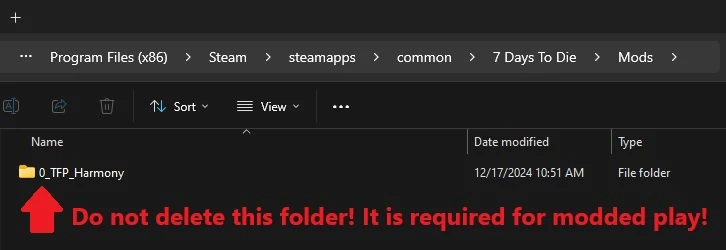
If you deleted this folder, here's how you fix that:
In Steam, Right-Click 7DtD, Properties, Installed Files, Run a File Integrity check.
It will download the missing Harmony file.

If you play with a lot of mods. You should disable EAC from the Game Launcher.
How to disable EAC from the Game Launcher:


Additional Links from FNS: