










FNS Self-Planting Trees
The trees immediately replant themselves in the same spot after you cut them down.It also drastically reduces tree seed drop rates, so there is less hassle with inventory management and replanting.
Additionally, using this mod is great for server performance because it keeps numpties from planting a damn forest in the city next to their base. If you didn't know, things like too many trees (and too many lights) in one area kills FPS even if you are running on an NASA server. The game engine itself cannot handle it.
For transparency:
The original work for this mod was made by a user named Saminal, but he stopped updating it years ago and it was abandoned. Per the 7DtD mod owner rules, for mods like this that are simply xml, if a mod has been abandoned for more than one year, and I made an attempt to contact the mod author (through DMs) and never heard back, I can maintain and update this mod. All credit for the original work remains his, but I have updated it through each game version update.
Saminal's original work can be found here: https://7daystodiemods.com/sams-sustainable-forestry/
Notices:
Notice 0: If you want to permanently remove a tree from a location, you need to chop down the tree and remove the soil block from beneath it. Dig it out!
Notice 1: This mod is only needed on the server side.
Notice 2: You must create a new world for this mod to work properly. The locations previously generated in existing worlds have already loaded their trees, and will not update. You could try to reset chunks, but this is not recommended as it could corrupt your save.
Notice 3: If you are playing with other mods that effect trees, tree growth, or tree seeds, this is probably going to cause you problems. Pick their mod, or this one, not both.
Notice 4: If you are using another mod that requires tree seeds for a recipe, don't use this mod in combination with it, as you will not get the tree seeds to drop as an ingredient to make those recipes. This should go without saying, but some people are thickies.
Notice 5: If you are a POI Designer who shares your POI files with others, you will want to disable/remove/avoid this mod when creating/exporting POI files. If your POI has a treehelper block, and someone else tries to install your POI, it will error due to the modded tree blocks not existing in their game. I learned this the hard way.
Notice 6: For those who want to remove the mod. If you remove the mod, and try to play in the same world, you might have errors. The engine (and code) running in the background of the saved game world is searching for something you removed, and is throwing an error. My recommendation is to remove the mod, then start a new game/world without the mod.
Mod Info:
1. You must disable EAC to play with this mod.
2. This is a Client-Side mod.
Help, I don't know what server side and client side mean?
When people say a mod is Server-Side only, they mean only the server (host computer) running the game in multiplayer needs to have the mod installed.
When they say Client-Side mod, that means every computer connected (including the server) needs the mod(s) installed.
If you are playing single player, only you need it, so it doesn't matter.
If you are playing multiplayer, or on a dedicated server, everyone (including the server) needs the Client side mods installed.
Installation
There are two major options for installing mods to 7DtD, pick one method.
1. You can automatically install all of the best mods using:

2. Or, you can Manually Install just this mod.
Download the mod(s) manually.
Extract the mods from the zip-folder.
You may choose to use the native Windows OS extraction tool by right-clicking the zipped file.
I personally prefer to use the 7-zip application to unzip files.
Put the unzipped mod folder(s) of the mod you just unzipped into the “Mods” folder of the game.
The recommended "Mods" folder to load unzipped mods to is:
C:\Users\YourUserName\AppData\Roaming\7DaysToDie\Mods
7DtD requires you to keep the Harmony folder installed in the base game's "Mods" folder.
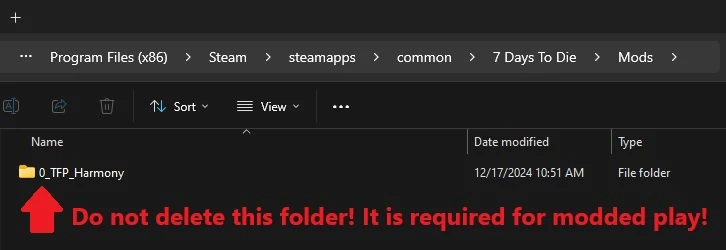
If you deleted this folder, here's how you fix that:
In Steam, Right-Click 7DtD, Properties, Installed Files, Run a File Integrity check.
It will download the missing Harmony file.

If you play with a lot of mods. You should disable EAC from the Game Launcher.
How to disable EAC from the Game Launcher:


Additional Links from FNS: