

FNS Transmute Arrows to Bolts
This modlet allows you to convert arrows to crossbow bolts, and vice versa.
This mod is compatible with, and pairs well with:
PGz Flashy Fletching v1
Crossbow Auto-reload 1.0
Archery Expansion
For transparency:
This is not my original modlet, a user named Elucidus created the work my mod is based off. I could not get his existing mod to work for recent versions of the game and I needed an updated version of the mod as part of my Smorgasbord Mod List. Elucidus granted me permission to maintain this mod. All credit for the original work is his.
Elucidus's original work can be found here: https://7daystodiemods.com/arrow-xbow-ammo-conversation-mod/
Notice 1:
This mod can be loaded into an existing save/world without issue.
Mod Info:
You may choose to keep EAC enabled, but I disable it.
This is a Server Side mod.
Help, I don't know what server side and client side mean?
When people say a mod is Server-Side only, they mean only the server (host computer) running the game in multiplayer needs to have the mod installed.
When they say Client-Side mod, that means every computer connected (including the server) needs the mod(s) installed.
If you are playing single player, only you need it, so it doesn't matter.
If you are playing multiplayer, or on a dedicated server, everyone (including the server) needs the Client side mods installed.
Installation
There are two major options for installing mods to 7DtD, pick one method.
1. You can automatically install all of the best mods using:

2. Or, you can Manually Install just this mod.
Download the mod(s) manually.
Extract the mods from the zip-folder.
You may choose to use the native Windows OS extraction tool by right-clicking the zipped file.
I personally prefer to use the 7-zip application to unzip files.
Put the unzipped mod folder(s) of the mod you just unzipped into the “Mods” folder of the game.
The recommended "Mods" folder to load unzipped mods to is:
C:\Users\YourUserName\AppData\Roaming\7DaysToDie\Mods
7DtD requires you to keep the Harmony folder installed in the base game's "Mods" folder.
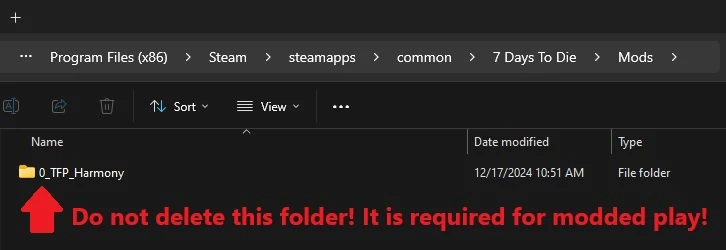
If you deleted this folder, here's how you fix that:
In Steam, Right-Click 7DtD, Properties, Installed Files, Run a File Integrity check.
It will download the missing Harmony file.

If you play with a lot of mods. You should disable EAC from the Game Launcher.
How to disable EAC from the Game Launcher:


Additional Links from FNS: