






FNS's Loot All the Things!
I am a loot goblin, but at the same time, I like preserving game balance.
This mod tries to strike a nice balance of being useful, but not overpowered.
Casual gamers who like a relaxed experience will love this mod as is with default 100% Loot Abundance settings.
Seasoned players should choose 75% Loot Abundance.
Hardcore gamers should lower their Loot Abundance % further, or just not use this mod.
This mod allows you to loot the following items:
Body Bags
Cardboard Boxes
Communion Tables
Computers
Ice Machines
IV Stands
Military Crates
Pallets
Pianos
Sofas
Tires
Toasters
Urinals
Water Barrels
Water Fountains
Wine Barrels
Wine Bottles
Soda Cans
Some users might say the Military Crates are too OP early game.
Yes, but I actually like military crates actually having ammo.
If you don't like that, remove/comment out those lines of code yourself.
I tested this mod at 100% Default loot settings, it's normal for some containers to be empty sometimes.
That's a feature, not a bug.
Warning: if you play with lowered loot settings, you are going to spend a lot more time looting empty containers. That's just how the loot system works. I can't/won't fix this. If you normally (with 100%) have a low chance of getting 0-3 bottles of murky water, but are playing at 75%, you're going to pull a lot more zeros, and no threes.
Notices:
Notice 1: You must create a new world for this mod to work properly.
The locations previously generated in existing worlds have already loaded their loot containers, and will not update.
You could try to reset chunks, but this is not recommended as it could corrupt your save.
Notice 2: This mod is only needed on the server side.
Notice 3: Users have reported this mod is temperamental with regards to load order. Most users have reported to make this the (one of the) very last mod, and that worked for them. It's probably based on this mod interacting with other mods in your load order. You might have to play around with your load order.
Notice 4: No, you cannot remove the mod, and play in the same world, it will error out. The engine (and code) running in the background of the saved game world is searching for something you removed, and is throwing an error. Remove the mod, then you have to start a new game/world without the mod.
Notice 5: This mod is not compatible with other "Loot non-lootable container" mods. Choose one, not two, not three, and not four mods trying to modify the same stuff! ONE!
Notice 6: If you are playing with the Modded CompoPack, it adds some of it's own variant modded blocks that will not be lootable. Example: you see RWG-mini-filler-POIs and full POIs with cardboard box pallets. Normally you can search them with the LAtT mod, but if they are from the Modded CompoPack, and that POI-maker used the CustomBlocksPack (CBP) version of the cardboard box pallet, it's not lootable. I will not be making a compatible variant.
Mod Info:
1. You must disable EAC to play with this mod.
2. This is a Client-Side mod.
Help, I don't know what server side and client side mean?
When people say a mod is Server-Side only, they mean only the server (host computer) running the game in multiplayer needs to have the mod installed.
When they say Client-Side mod, that means every computer connected (including the server) needs the mod(s) installed.
If you are playing single player, only you need it, so it doesn't matter.
If you are playing multiplayer, or on a dedicated server, everyone (including the server) needs the Client side mods installed.
Installation
There are two major options for installing mods to 7DtD, pick one method.
1. You can automatically install all of the best mods using:

2. Or, you can Manually Install just this mod.
Download the mod(s) manually.
Extract the mods from the zip-folder.
You may choose to use the native Windows OS extraction tool by right-clicking the zipped file.
I personally prefer to use the 7-zip application to unzip files.
Put the unzipped mod folder(s) of the mod you just unzipped into the “Mods” folder of the game.
The recommended "Mods" folder to load unzipped mods to is:
C:\Users\YourUserName\AppData\Roaming\7DaysToDie\Mods
7DtD requires you to keep the Harmony folder installed in the base game's "Mods" folder.
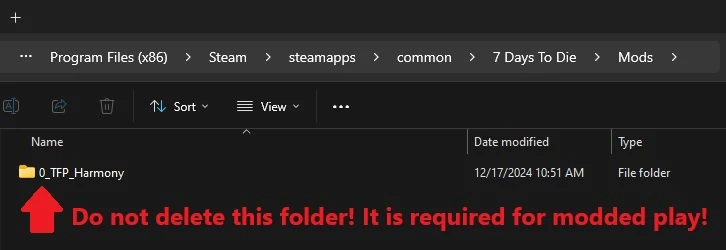
If you deleted this folder, here's how you fix that:
In Steam, Right-Click 7DtD, Properties, Installed Files, Run a File Integrity check.
It will download the missing Harmony file.

If you play with a lot of mods. You should disable EAC from the Game Launcher.
How to disable EAC from the Game Launcher:


Additional Links from FNS:
For transparency:
I was inspired by TribalDragon19's LootableEverything mod.
There are a few "loot more things" mods out there, but his was my favorite.
My only problem with his, is that I felt it was too overpowered for my Mod List.
TribalDragon19 approved of my variants, and was kind enough to allow me to keep this version up for people who like the nerfs.
If you are looking for a beefier version for higher power games, check out his original version.