

FNS Larger and Slower Prey Animals v2
1. This mod makes all of the Stags, Chickens, Does, and Rabbits a little bit larger. And yes, for the one guy thinking it; the plural of doe, is does.
2. This mod also makes the Prey Animals move slower after they start their "MoveSpeedPanic" mode... in 2.x TFP cranked their speed up to ludicrous levels.
This mod was made to help the visually impaired and/or those who suck at aiming with the bow. And no, the animals are not Kaiju-sized, the pictures in this mod page were just there for the lolz.
If the animals sizes need to be increased/decreased to suit your needs, you can easily modify the xml file yourself to scale them in either direction. I'm not going to do this for you, you can put on your big kid pants and figure it out, I promise it's not hard. Hint: 1 is the normal number, 1.2 equals twenty percent larger. If you can't extrapolate that basic math, you need to sort yourself out.
For transparency:
This is not my original work, a user named Khelldon created two similar mods my mod is based off.
Khelldon gave me permission to maintain this mod. All credit for this mod is his.
Khelldon's original works can be found here:
https://7daystodiemods.com/bigger-chicken-and-bunny/
https://7daystodiemods.com/bigger-buck-and-doe/
Mod Info:
You may choose to keep EAC enabled, but I disable it.
This is a Server Side mod.
Help, I don't know what server side and client side mean?
When people say a mod is Server-Side only, they mean only the server (host computer) running the game in multiplayer needs to have the mod installed.
When they say Client-Side mod, that means every computer connected (including the server) needs the mod(s) installed.
If you are playing single player, only you need it, so it doesn't matter.
If you are playing multiplayer, or on a dedicated server, everyone (including the server) needs the Client side mods installed.
Installation
There are two major options for installing mods to 7DtD, pick one method.
1. You can automatically install all of the best mods using:

2. Or, you can Manually Install just this mod.
Download the mod(s) manually.
Extract the mods from the zip-folder.
You may choose to use the native Windows OS extraction tool by right-clicking the zipped file.
I personally prefer to use the 7-zip application to unzip files.
Put the unzipped mod folder(s) of the mod you just unzipped into the “Mods” folder of the game.
The recommended "Mods" folder to load unzipped mods to is:
C:\Users\YourUserName\AppData\Roaming\7DaysToDie\Mods
7DtD requires you to keep the Harmony folder installed in the base game's "Mods" folder.
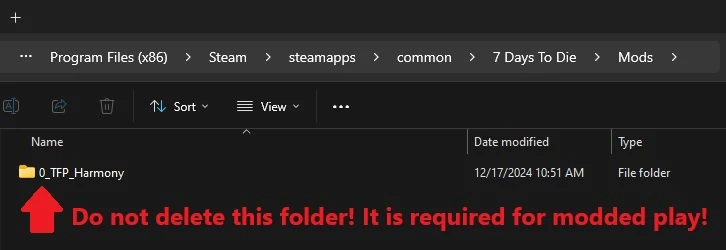
If you deleted this folder, here's how you fix that:
In Steam, Right-Click 7DtD, Properties, Installed Files, Run a File Integrity check.
It will download the missing Harmony file.

If you play with a lot of mods. You should disable EAC from the Game Launcher.
How to disable EAC from the Game Launcher:


Additional Links from FNS: