































FNS Snow-to-H2O and Other Obvious Recipes
1. This mod allows you to cook Snow into Boiled Water.2. Normally you need Boiled Water, but with this mod you can now also use Murky Water for crafting Glue, Paint, and Paper.
3. Craft 5 fiber into one climbable rope block from the backpack.
4. Render down Rotting Flesh and Murky Water in a cooking pot for Fat.
You can craft some of the recipes at the campfire (with cookpot), but some of the recipes must use the chemistry station.
Snow-into-Boiled-Water at the chemistry station will require you to search/track the recipe.
This mod was a very straightforward request from a user from the GNS Discord.
Why I made this mod:
Are players drinking Glue, slurping up Paint, and eating Paper?
No? Then it shouldn't require potable water!
A child can see that boiling snow into clean water is a useful survival strategy.
Balance smalance, these are basic things you should be able to do in a survival crafting game!
Mod Info:
You may choose to keep EAC enabled, but I disable it.
This is a Server Side mod.
Help, I don't know what server side and client side mean?
When people say a mod is Server-Side only, they mean only the server (host computer) running the game in multiplayer needs to have the mod installed.
When they say Client-Side mod, that means every computer connected (including the server) needs the mod(s) installed.
If you are playing single player, only you need it, so it doesn't matter.
If you are playing multiplayer, or on a dedicated server, everyone (including the server) needs the Client side mods installed.
Installation
There are two major options for installing mods to 7DtD, pick one method.
1. You can automatically install all of the best mods using:

2. Or, you can Manually Install just this mod.
Download the mod(s) manually.
Extract the mods from the zip-folder.
You may choose to use the native Windows OS extraction tool by right-clicking the zipped file.
I personally prefer to use the 7-zip application to unzip files.
Put the unzipped mod folder(s) of the mod you just unzipped into the “Mods” folder of the game.
The recommended "Mods" folder to load unzipped mods to is:
C:\Users\YourUserName\AppData\Roaming\7DaysToDie\Mods
7DtD requires you to keep the Harmony folder installed in the base game's "Mods" folder.
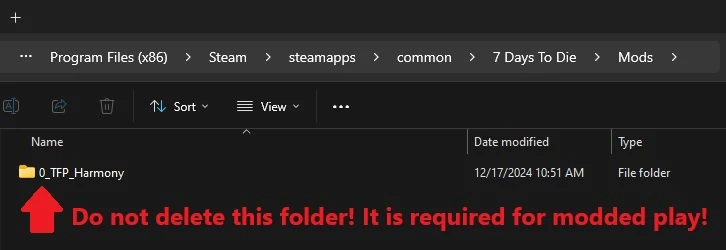
If you deleted this folder, here's how you fix that:
In Steam, Right-Click 7DtD, Properties, Installed Files, Run a File Integrity check.
It will download the missing Harmony file.

If you play with a lot of mods. You should disable EAC from the Game Launcher.
How to disable EAC from the Game Launcher:


Additional Links from FNS: