




Khaine's 12 Slot Crafting Queue
Increases the crafting queue from 4 slots to 12. Scrap everything!
For transparency:
FNS was given permission by Khaine, the original author, to act as a custodian for this mod.
Khaine did all of the original work and testing. All credit is rightly his.
Khaine's original work can be found here: 12 Slot Crafting Queue
If you appreciate KhaineGB’s work and you want to show support, use this donate link.
Notice on UI/HUD Compatibility:
This mod has two minor issues when using other HUD/UI mods.
1. There could be some visual overlap with the 12-slot crafting queue and the backpack and/or toolbelt.
2. On some UI/HUD mods you cannot cancel out the crafting/scrapping of all 12 slots. You can just barely cancel the first slot. Either live with it, turn off your UI/HUD mods, or turn off the 12-slot mod, or adjust the xml yourself.
3. I have tested this mod with AGF V3 HUDPlus and the accompanying AGF V3 Larger Backpacks 84 Slot mod. Khaine's 12-Slot queue works and looks good with AGF's entire UI/HUD mod suite.
Mod Info:
You may choose to keep EAC enabled, but I disable it.
This is a Server Side mod.
When people say a mod is Server-Side only, they mean only the server (host computer) running the game in multiplayer needs to have the mod installed.
When they say Client-Side mod, that means every computer connected (including the server) needs the mod(s) installed.
If you are playing single player, only you need it, so it doesn't matter.
If you are playing multiplayer, or on a dedicated server, everyone (including the server) needs the Client side mods installed.
Download the mod(s) manually.
Extract the mods from the zip-folder.
You may choose to use the native Windows OS extraction tool by right-clicking the zipped file.
I personally prefer to use the 7-zip application to unzip files.
Put the unzipped mod folder(s) of the mod you just unzipped into the “Mods” folder of the game.
The recommended "Mods" folder to load unzipped mods to is:

7DtD requires you to keep the Harmony folder installed in the base game's "Mods" folder.
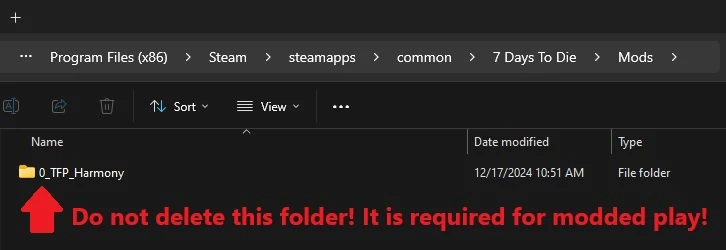
If you deleted this folder, here's how you fix that:
In Steam, Right-Click 7DtD, Properties, Installed Files, Run a File Integrity check.
It will download the missing Harmony file.

If you play with a lot of mods. You should disable EAC from the Game Launcher.
How to disable EAC from the Game Launcher:


Additional Links from FNS:
Increases the crafting queue from 4 slots to 12. Scrap everything!
For transparency:
FNS was given permission by Khaine, the original author, to act as a custodian for this mod.
Khaine did all of the original work and testing. All credit is rightly his.
Khaine's original work can be found here: 12 Slot Crafting Queue
If you appreciate KhaineGB’s work and you want to show support, use this donate link.
Notice on UI/HUD Compatibility:
This mod has two minor issues when using other HUD/UI mods.
1. There could be some visual overlap with the 12-slot crafting queue and the backpack and/or toolbelt.
2. On some UI/HUD mods you cannot cancel out the crafting/scrapping of all 12 slots. You can just barely cancel the first slot. Either live with it, turn off your UI/HUD mods, or turn off the 12-slot mod, or adjust the xml yourself.
3. I have tested this mod with AGF V3 HUDPlus and the accompanying AGF V3 Larger Backpacks 84 Slot mod. Khaine's 12-Slot queue works and looks good with AGF's entire UI/HUD mod suite.
Mod Info:
You may choose to keep EAC enabled, but I disable it.
This is a Server Side mod.
Help, I don't know what server side and client side mean?
When people say a mod is Server-Side only, they mean only the server (host computer) running the game in multiplayer needs to have the mod installed.
When they say Client-Side mod, that means every computer connected (including the server) needs the mod(s) installed.
If you are playing single player, only you need it, so it doesn't matter.
If you are playing multiplayer, or on a dedicated server, everyone (including the server) needs the Client side mods installed.
Installation
Manually InstallationDownload the mod(s) manually.
Extract the mods from the zip-folder.
You may choose to use the native Windows OS extraction tool by right-clicking the zipped file.
I personally prefer to use the 7-zip application to unzip files.
Put the unzipped mod folder(s) of the mod you just unzipped into the “Mods” folder of the game.
The recommended "Mods" folder to load unzipped mods to is:
C:\Users\YourUserName\AppData\Roaming\7DaysToDie\Mods7DtD requires you to keep the Harmony folder installed in the base game's "Mods" folder.
If you deleted this folder, here's how you fix that:
In Steam, Right-Click 7DtD, Properties, Installed Files, Run a File Integrity check.
It will download the missing Harmony file.
If you play with a lot of mods. You should disable EAC from the Game Launcher.
How to disable EAC from the Game Launcher:
Additional Links from FNS: