
OPEN BETA NOTICE: Safe to install and remove mid-playthrough. Core player, NPC, and creature poise mechanics, status debuffs, directional stagger integration, and both HUD themes are live and ready for testing. This is an active work-in-progress beta—balance, spell coverage, and experimental features (such as the Target Poise Bar) will continue to evolve based on playtesting and feedback.
Version Validation: Built-in poise hooks are currently validated for Skyrim SE/AE 1.7.104.0.
A lightweight, engine-level SKSE poise overhaul and custom Prisma UI HUD built from the ground up with zero ESP/ESL plugin bloat and aims for seamless compatibility with modern combat setups(I'm just one person and there is a near infinite amount of mod combinations. Although I've tested extensively with different mod set ups, more testing is required to ensure overall compatibility. All my current tests have resulted in very minor to zero issues). Every swing, arrow, and spell chips away at an actor's posture—when poise hits zero, they stagger proportionally to the breaking blow.
Dev Log — Nov 23, 2026
- Actor Bars: Added floating Health, Magicka, and Poise bars for all actors engaged in combat—including enemies and companions—complete with active debuff icons underneath.
- SKSE Menu Cleanup: Added a poise meter style dropdown and trimmed out redundant options—UI refinement here is still ongoing.
- Up Next & Ongoing: Actively working on the bleed overhaul, while overall combat and poise balancing remains ongoing.
Note: Actor stamina bars were intentionally omitted to avoid visual clutter, though I'll look into adding an optional toggle if enough players request it.
Core Combat & Poise Mechanics
- Real Armor & Build Trade-Offs: Maximum poise starts at
40and scales dynamically with your gear:- Heavy Armor: Gains full poise from worn armor weight (
1.0xby default). - Light Armor: Gains weight poise plus a bonus from base armor rating (
+0.15per point, up to+15), while retaining75%of Alteration Flesh spell poise bonuses (compared to45%in Heavy Armor and100%unarmored).
- Heavy Armor: Gains full poise from worn armor weight (
- Physical Hits, Blocking & Pushback Suppression:
- Weapon poise damage scales off weapon weight (
0.35x) and physical hit damage (5%, capped at+6and omitted on shield blocks), multiplied by attack type (Two-Handed1.15x, Power Attacks1.5x, Arrows0.65x, Weapon Bash0.35x, Shield Bash1.0x). - Active Defense Matters: Unblocked hits deal
100%poise damage; blocking with a weapon cuts it to45%, and blocking with a shield cuts it to25%. - No Flinch Spam: Handled hits suppress vanilla physical pushback (
bEnableHitPushBack=false) while poise remains positive, keeping combat responsive until a real poise break occurs.
- Weapon poise damage scales off weapon weight (
- Magic, Wards & Alteration Shields:
- Elemental burst projectiles, beams, and explosions deal poise damage scaled by elemental and magic resistances, as well as target armor class (
0.70xclothing,1.00xLight Armor,1.15xHeavy Armor). - Wards Overhauled: Wards intercept incoming spell poise damage (
0.35x) with zero extra Magicka cost and no longer trigger the frustrating vanilla ward-break stagger lock. - Channeled Spells: Flames, Frostbite, and Sparks apply status debuffs without direct poise damage by default (can be toggled on in settings with pooled per-second caps).
- Elemental burst projectiles, beams, and explosions deal poise damage scaled by elemental and magic resistances, as well as target armor class (
- Tiered Creature Poise & Anti-Stunlock:
- Creatures are balanced across four tiers: Light (
0.75x— wolves, skeevers), Medium (1.7x— draugr, falmer, sabre cats), Heavy (3.75x— bears, trolls, werewolves), and Boss (6.0x— dragons, giants, dragon priests, centurions). - Creatures gain a 2-second stagger immunity window after a poise break to prevent stunlocks, while Bosses regenerate
1.5xfaster and always trigger full native staggers. Summoned/commanded allies gain1.5xmax poise.
- Creatures are balanced across four tiers: Light (
- Proportional Staggers (Modern Stagger Lock Ready):
- Poise breaks calculate stagger magnitude dynamically (
final breaking poise damage / max poise, clamped between0.25and1.0). When Modern Stagger Lock (MSL) is installed, it automatically selects Small, Medium, Large, or Largest directional stagger animations to match the hit.
- Poise breaks calculate stagger magnitude dynamically (
Poise Status Debuffs
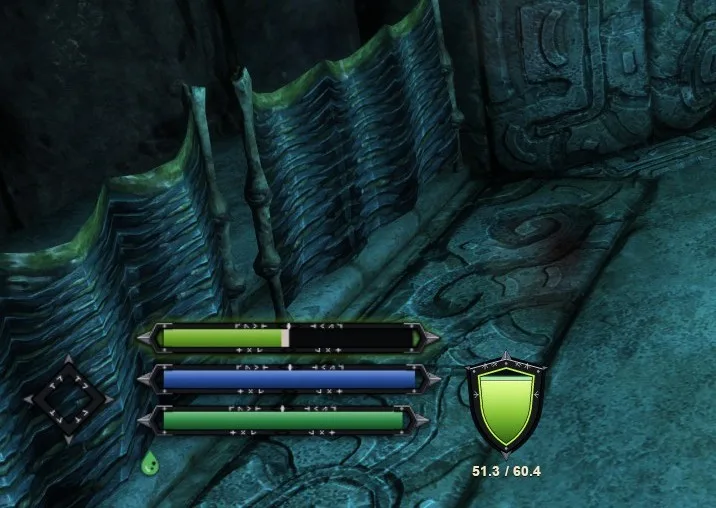 Enfeebled (Poison) active — dynamic bar tinting, debuff icon, and recovery ceiling notch.
Hostile damage-over-time and drain effects pressure your posture recovery rather than dealing flat poise damage, each debuff displays its own custom HUD icon underneath the stamina bar and dynamically shifts the poise meter's color so you can read active effects at a glance:
- Sapped (Absorb Effects): Halts poise regeneration completely (~2 seconds per absorb weapon hit).
- Enfeebled (Poisons): Caps maximum poise recovery between
70%and85%depending on poison strength (marked by a tick on your poise bar). - Numbed (Lingering Frost): Adds
+1.0sdelay before poise begins regenerating. - Hemorrhaging (Bleed Effects): Slows poise regeneration speed to
65%(works with War Axe perks and mod-added bleeds). - Scorched (Lingering Fire): Increases incoming melee and bash poise damage by
1.2x.
Modular HUD & Visuals (Prisma UI)
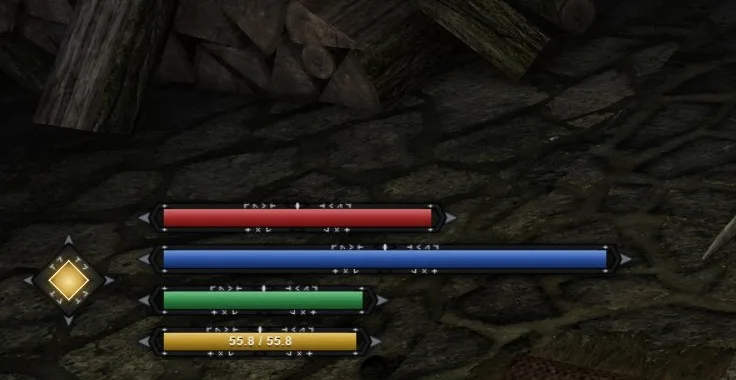 Sneak Light Gem — dynamically measures real-time ambient light levels on your character while sneaking
Built cleanly in HTML/CSS via Prisma UI with zero Scaleform/Flash lag:
- Two Included HUD Themes: Switch anytime between the default Daedric Iron theme (featuring the standalone Forged Shield poise meter) and the Minimalist theme (with customizable filigree, shine, shadow depth, and quarter-mark notches).
- Reactive Bar & Debuff Feedback: Your poise bar dynamically shifts color and displays status icons under active debuffs (violet for Sapped, toxic green for Enfeebled, orange for Scorched, icy blue for Numbed, crimson for Hemorrhaging). Minimalist resource bars also react visually to poison, fire, frost, bleed, and shock hits.
- Smart Contextual Visibility: Resource bars fade out cleanly when idle at full stats and reappear when drawing a weapon, entering combat, sprinting, or taking damage. Includes optional Weather/Location and Sneak Light Gem widgets.
- Flexible Third-Party HUD Modes:
- Full Custom HUD (
bEnableCustomHud=true): Replaces vanilla Health, Magicka, Stamina, and weapon charge bars. To pair with TrueHUD, leave this enabled and simply toggle off TrueHUD's overlapping player bars in its MCM while keeping enemy health bars active. - Standalone Widget Mode (
bEnableCustomHud=false): Keep vanilla or third-party resource bars while running the Forged Shield poise meter and Weather Widget independently.
- Full Custom HUD (
 Standalone Forged Shield poise meter — works alongside vanilla bars or other HUD mods (
bEnableCustomHud=false).
- Live In-Game Tuning (
F10): Adjust almost every multiplier, threshold, and HUD offset inside SKSE Menu Framework → TruePoise (orData\SKSE\Plugins\TruePoise.ini) and press F10 in-game to live-reload immediately without restarting.
What's Shown in the Gallery Screenshots
- Live Combat & HUD Themes: Demonstrates the player-facing Daedric Iron HUD (with the Forged Shield poise meter, and custom resource bars), and optional Weather/Location and Sneak Light Gem widgets.
- Poise Status Debuffs: Shows active debuff icons appearing beneath the poise bar alongside dynamic bar color shifts and the Enfeebled recovery ceiling tick.
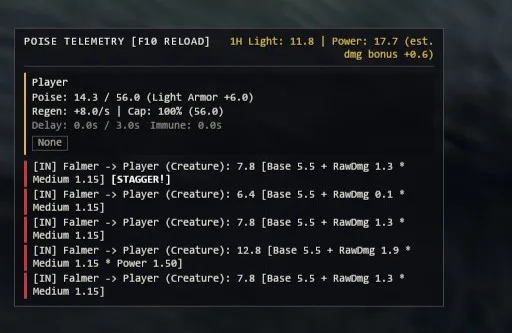
- Note on the Poise Telemetry Window: One of the beta screenshots shows the Poise Telemetry diagnostic overlay in the upper-left corner. This is a developer/testing tool (
bShowPoiseTelemetry, disabled by default)—not a standard gameplay HUD element. It is included in the beta gallery to show how deeply the engine tracks armor weights, elemental resistances, power-attack multipliers, and live poise math under the hood. (You can toggle it anytime via theshowpoisedevconsole command if you want to inspect detailed poise damage math.)
Compatibility Notes:
- Modern Stagger Lock (MSL) — Strongly Recommended: Automatically feeds proportional stagger magnitudes and directional hit angles into MSL for dynamic Small, Medium, Large, and Largest stagger animations.
- Designed to work alongside Valhalla Combat, BFCO, Precision, and TrueHUD or other HUD mods.
- Auto-Safe: Automatically disables built-in poise if Chocolate Poise is detected so they never conflict.
- No ESP/ESL: Pure SKSE/Prisma UI plugin—safe to install or remove mid-playthrough without save bloat.
How to Install:
- Install all requirements for your game version.
- Download
TruePoise_0.9.0.zipand install it through Mod Organizer 2, then enable it. - Open SKSE Menu Framework → TruePoise in-game to customize settings, then press F10 to apply.
Beta Roadmap & Design Philosophy
TruePoise is built around a simple core philosophy: modular design, broad compatibility, and deep configurability—giving you full control over how the system plays without forcing rigid dependencies on your load order.
As the Open Beta continues to evolve toward 1.0, here is what is actively planned:
- Three Built-In Difficulty Presets: One-click baseline profiles (Lite / Forgiving, Standard, and Brutal / Realistic) alongside full individual slider control.
- Bleed Mechanic Overhaul: Reworking Skyrim's underwhelming vanilla bleed implementation into a meaningful, responsive combat mechanic that ties directly into posture pressure.
- Polished Enemy Poise Bars & Target HUD: Refining the experimental Target Poise Bar into a full, polished enemy HUD suite—including optional Enemy Health & Magicka Bars.
- SKSE Menu Cleanup & Polish: Streamlining the in-game SKSE Menu Framework layout for cleaner organization and faster tuning.
- Continued Compatibility & Balance: Ongoing creature tier tuning, spell/mod coverage, and compatibility support across popular combat setups.
- Active bug fixing
- ...and more based on community playtesting and feedback!
Support the Project
TruePoise is—and will always remain—100% free. I put a lot of work into this one and I'm having a good time building this. Spent many weeks on this coding, tweaking, bug hunting, building and running diagnostic builds, diving deep into this 15 year old engine until the sun came up and beyond. For this release I tried my best to make it as feature complete and bug free as possible but in the end, I'm just one dude... I just hope everyone enjoys it, and if you're feeling generous: