





































HUD of the Hold
See every fight. - BETA
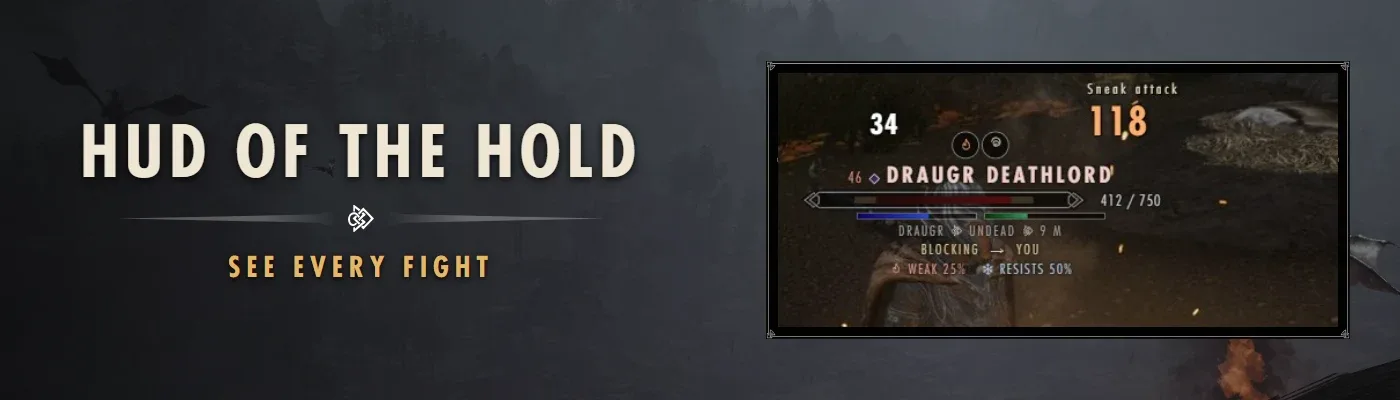
Who you're fighting, how hurt they are and what they're about to do, right over their heads.See every fight. - BETA
HUD of the Hold puts a bar over everyone in the fight: the one you're fighting, every enemy, your followers and your band, and anyone else caught up in it. Dragons, dragon priests and dungeon bosses get big bars along the bottom of the screen. Every part of every bar is a switch, and you set them on its own screen with a live preview, so you see each change the moment you make it.

Why you'll want it
- A bar for everyone in the fight. Your target, enemies, allies and others in the fight each have their own set of switches, so your target can show everything while the rest stay slim. Up to 48 bars at once (24 to start), closest first, and your target always makes the cut.
- Boss bars. Up to 4 along the bottom of the screen, placed and sized where you want them, stacking up or down.
- What's on them. Burning, frozen, shocked, poisoned, paralysed, staggered, afraid, calmed, frenzied, bleeding, invisible, ethereal, and down on their knees, each with its own icon.
- Learn their weak spots. Hit something with fire, frost, shock, poison or magic and its bar remembers how its kind takes it: Weak 25%, Resists 50% or Immune. It stays learned for every one of its kind you meet after.
- Floating damage numbers in the colour of what hit them: physical, fire, frost, shock, poison or magic. Sneak attacks, power attacks, bashes and killing blows get their own label. Heal numbers too, if you want them.
- Who they are. Their level as a number, a soul size or both, coloured by how it compares to yours. Their faction. A mark for undead, daedra, dragons, animals, machines and summons. Essential and protected marks. How far away they are.
- What they're doing. Casting, blocking, drawing a bow, attacking or bashing, and who they're going after.
- A lagging bar shows how much the last hit took, and the damage you've done lately sits beside the bar.
- Arrows at the edge of the screen tell you how many enemies are behind you.

Three looks
Pick one look for the bars over people and one for the boss bars. Every switch works the same in every look.
- Warband: Skyrim's own health meter in three pieces, knot ornaments between the details, a level diamond and line ornaments on boss bars, and status effects in small silver rings.
- Plate: each bar on a small plate in Skyrim's item-card frame, with the name on top, a level tab, and the bar, icons and details inside it. Boss bars are wide framed plates.
- Minimal: no frames at all. Hair-thin lines with faded ends, like the compass, small spaced letters and tiny icons.
Besides the three looks, HUD of the Hold takes theme packs. A pack restyles every bar, the boss bars, your own bars and the damage numbers, with its own art and lettering. Five packs and sixteen themes, each pack its own download under the optional files:
- Shadows of Skyrim: Night Mother, Shadowmark, Butcher's Mark, Warchief, Daedric Pact.
- Hearth and Heart: Sweetroll, Harvest Pixel, Fairy Glen, Rose Gold, Moonlit Silk.
- Old Tamriel: Runestone, Dwemer Brass, Elder Scroll, Frostfall.
- Out There: Neon Arcana.
- Modhold: The Hold, in the look of Modhold's Skyrim section.
Your own bars
- Health, magicka and stamina at the bottom left, in the look or theme you picked, with numbers and a lagging bar. Show them always, only when you're hurt or tired, or only in a fight.
- A stats box above them: the time and date, your fire, frost, shock, magic, poison and disease resistance and your armour, your level, carry weight and gold.
- Skyrim's own health, magicka and stamina bars and its enemy bar at the top are hidden while HUD of the Hold draws its own. Each is a switch.

Your own editor
Every switch is on its own screen in the same style as Warband's party screen. Open it from HUDHOLD in the Tab menu (with Tween Menu Overhaul), with a key you set in the editor, or from SKSE Menu Framework's menu.
- Tabs: General, Packs, Your target, Enemies, Allies, Others in a fight, Boss bars, Colours and Presets.
- Live preview: a fight drawn in the look you picked, with a close-up of the bar you're working on. Turn something on or off and you see it there straight away.
- Colours: the name colour for hostile, neutral and allied, the lagging bar, and the damage numbers for each element.
- Presets: save every switch as a preset, load one, or go back to the defaults. Presets are plain files in Data\SKSE\Plugins\CombatHUD\Presets\, so you can send yours to a friend.
- Controller: the whole editor works on a controller. D-pad or left stick to move (hold to keep going), A to pick, B to go back, LB and RB for the tabs, right stick to scroll. The hints at the bottom switch to your controller's buttons.
- Changes save on their own.

Boss bars
- Who gets one: every dragon, every dragon priest, the boss at the end of a dungeon (the one the game itself marks as the boss), and named foes like Alduin, Harkon, Vyrthur, Durnehviir, Miraak, Karstaag and the Ebony Warrior.
- A boss bar shows while a boss is hostile to you and fighting, or when you aim at it. Never for your followers or your band, and never for townsfolk the game tags as the boss of their own house.
- Add your own: every .ini in Data\SKSE\Plugins\CombatHUD\Bosses\ is read, one line per race or person. A patch for another mod's bosses is one small file next to mine.

Plays well with
- Warband: your band members show their rank and post on their bar, like "Veteran Quartermaster".
- Nemesis: your rivals' titles show in their names ("Captain", "Warlord").
- Skyrim Party Sheet: it already shows your party, so with it installed the ally bars start off. Turn them on any time.
- HUD of the Hold draws enemy bars, boss bars, your own bars and a stats box. If another mod draws any of those too, turn that part off so you don't get two sets.

Installation
Built and played in a Nolvus Awakening load order. Nolvus users: install it like any other mod.
Install with your mod manager. HUD of the Hold is an SKSE plugin with no .esp, so it doesn't use a load order slot. Safe to install mid-game: load your save, and the bars are there at your next fight; open the editor from the Tab menu to set them up.
- Needs: SKSE, Address Library for SKSE Plugins, SKSE Menu Framework (3 or newer).
- For the editor screen: Magelight UI (1.6 or newer).
- Optional: Tween Menu Overhaul, for the HUDHOLD entry in the Tab menu.
Compatibility
- Skyrim SE 1.5.97 and AE. Not for VR.
- Nothing in the game is changed: there's no plugin, so no record is touched. It only draws.
- Works with any follower, any band and any enemy, from any mod.
Where a bar sits is worked out every frame, only for the people on screen. Everything else about them (effects, faction, what they're doing) is read four times a second per person, a few people each frame. It keeps at most 24 bars up unless you raise it. Nothing goes into your save, and nothing runs as a script.
Uninstalling
Safe to remove any time: nothing is in your save. Your settings stay in Data\SKSE\Plugins\CombatHUD\ (in MO2's overwrite) in case you come back.

The beta
HUD of the Hold is still being built and tested. Supporters get it now to help test it: play with it, and send what you find, the bugs, your ideas and your screenshots, as beta reports here on Modhold or in the Discord. Each report gets looked at and fixed in a new build. Once everyone agrees it's ready, it ships to everyone.
To join, become a supporter with the button on this page.
- What helps the most: a screenshot of the bars, and Documents\My Games\Skyrim Special Edition\SKSE\CombatHUD.log.
- Warband - a follower framework and party manager in one.
- Nemesis - enemies who beat you come back stronger, with names.
- Reputation - every hold remembers what you did there.
- Skyrim Kings - rule a realm, with lords, wars and a court.
- Estates of Skyrim - every home you own becomes a living estate.
- Word Travels - your friends seek you out to talk about your deeds.
- Amber - a fully voiced thief follower and skilled fence.

Credits
Thanks to the SKSE team, meh321 for Address Library, Thiago for SKSE Menu Framework, Severause for Magelight UI, and CommonLibSSE-NG (CharmedBaryon) and spdlog, used in the mod's SKSE plugin. The bars use Skyrim's own menu art and font; the theme packs' lettering is free fonts under the SIL Open Font License from Google Fonts, with their licence texts in each pack. Built with houseCARL.
About AI use
This mod was built with the help of an AI coding assistant (the SKSE plugin and the editor screen). I fix reports fast, so tell me in the posts if anything's off.