All my three mods are now available for Skyrim Special Edition:
= [ Riverside Lodge, Mammoth Manor, Breezehome ] =
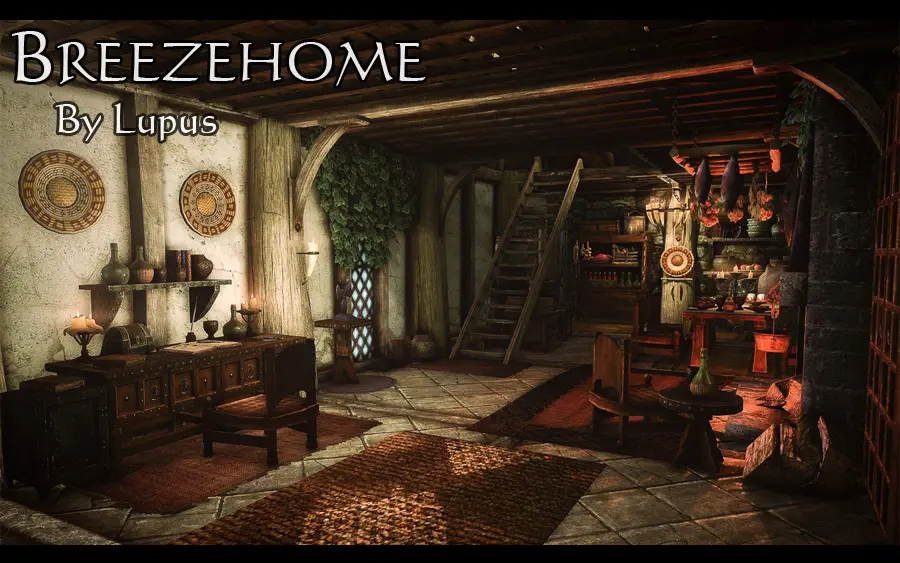
There are plenty of Breezehome mods already available. I know. But I wanted to make a version of my own - with my own flavour. I've kept the house somewhat "true to original", since I have always felt Breezehome needs to feel like a small town house, not a large mansion. So no added basements, towers, smithing areas or hoarder's mannequins and displays. But it doesn't have to feel crappy, either. Just compact and functional. As always, I like to keep things simple with mostly ingame assets and minimal amount of custom stuff. But what I can't live without, are the autosorter scripts that I've used in my other player homes, so those are there of course (and you can turn them off individually if you do not prefer to use them).= [ Riverside Lodge, Mammoth Manor, Breezehome ] =
Intro by Hodilton:Intro by SuprisedRook (using some custom textures):Showcase by NorthWind:Main Features:
- All the furniture and items are included in the decoration packages bought from Jarl's steward (just as in vanilla).
- All clutter is STATIC. So no bouncing them around or picking up by accident. They're there just to look pretty.
- Added an enchanter next to the alchemy station and a hearthfire's oven to the kitchen.
- There is a weapon rack for five weapons by the door and a single plaque for a shield & two weapons in the Loft.
- Added several bookshelves and containers for different purposes.
- Added a crafting storage next to the Warmaiden's forge (key is on the desk after buying the living room decorations).
- Autosorter scripts for food, beverage, potions, alchemy ingredients, soulgems, gems & valuables, books & notes and crafting storages.
- Individual sorters can be turned on and off from the menu activated by the book on the main desk in the living room.
- All the basic functionality from the vanilla house should still be there (like having the option to have childrens room with two beds).
Recommended mods:
- Works well with most mods that alter the exterior of the house, like the JK's Whiterun that I use myself.
- My Home Is Your Home - This works great for the followers (other than spouse), so that they can live in your house and you can assign them areas where you want them to sleep and work. Works great with the spouse/kid-related mods.
- Multiple Floors Sandboxing - This is a highly recommended mod for any followers since it makes the followers move more freely around the interiors, not just sticking into a particular area you've left them.
Compatibility:
- Should be compatible with any Whiterun mods that do not alter interior of breezehome (like some lighting mods do). This can for example conflict and cause some problems.
- Open Cities is compatible, but my Breezehome needs to be loaded before open cities mod (check load order).
== FAQ =============
- Remember to buy the decoration packages from Jarl's steward. Otherwise it's just an empty house.
- Any mods you've used before that have changed the state of the objects can conflict with my mod and create problems.
- If you DO install the mod after already using the breezehome in any configuration, just know that you should first remove all your stuff from previous breezehome and go outside. Then after updating you might encounter some weird floating items, but usually you can easily get rid of those by opening up console, clicking them with the mouse and typing "disable". Everything left in the old weapon racks or shelves will be either floating in the air (racks) or littered on the floor (shelves) and you need to pick them up (should have done it before updating).
- No matter the way you install the mod, just make sure the .esp and .bsa files are in your skyrim/data folder and that the mod file is activated.
Credits and thanks:
- Manilla Turtle for his "Automatic Item Storage" that I've modified for my own purposes.
- Blary for his OpenBooks Resource. Love those books!
- Eldiabs for making the awesome "Modders Resource" (for the shelves and the weapon rack).