




















































New release · Stardew
Modhold News
Update
Press one button and the Modhold app sets up a whole Skyrim modlist for you, outfits and all
No installers to click through, no BodySlide sliders, no lost saves when the list updates. And a way to play without MO2 is on its way.
24 Nov 2026 · By Modhold
Getting a big Skyrim modlist running has always meant an evening of installers, load orders and BodySlide sliders. The Modhold app now does that work for you: pick a list, press one button, and play.
It installs the whole list for you
Open the Lists tab, pick a list and press its button. The app downloads every mod, answers each mod's install options the way the list was built, puts in what Skyrim needs to run it, and sets the mods' settings. If something stops it partway, you can change the list's options and carry on from where it left off.
Your outfits come out right
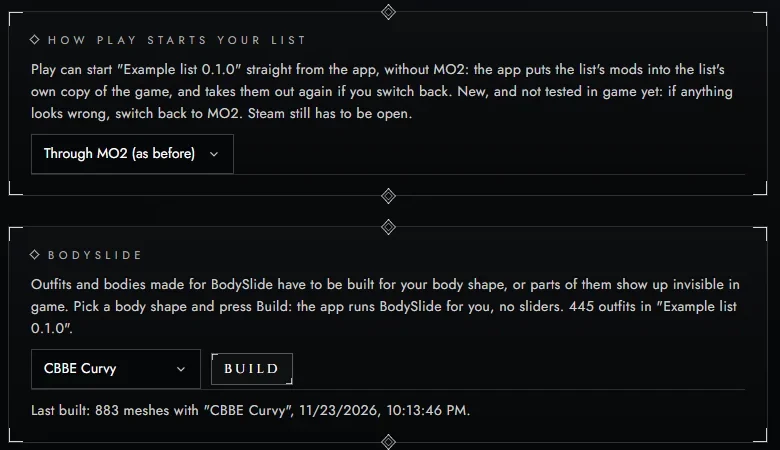
Mods made for BodySlide usually need you to open BodySlide and build every outfit yourself, or people show up with parts of their body missing. The app now builds them for you right after the list installs, in the list's body shape. Want a different shape? Pick one on the Setup page and press Build. You never open BodySlide.
Updates keep your saves
When a list gets a new version, the app updates the one you have in place. Your saves and settings stay right where they were.
Playing without MO2 is on its way
You'll soon be able to skip MO2 completely: the app puts the list's mods into its own copy of the game and starts it for you. The first version is in the app now, marked as new and not tested in game yet, so MO2 and Wabbajack stay the default until it's ready.
When something breaks, one button tells us why
Send bug report packs up what we need on its own: your crash logs, your mods' versions, screenshots if you add them. You never have to dig for files or answer a list of questions.
Get the Modhold app. It's free, and it keeps itself up to date.
More from Modhold News
New release · Skyrim LE
Skyrim Legendary Edition mods are coming back: new LE homes, a follower and a memory fix
Players’ pick · Skyrim SE