




































This is a basical modlist, for wabbajack, for users to begin their own modlist.. this is only the essential mods, UI mods, 3BA body mods, and Animation mods (Pandora).
It uses Mod Organizer 2, based on v1.6.1170 (you will need the Current 1.7 update of the game and the CC content in order to install)
Now, many will be saying "But Reaper, I have no clue how to use Wabbajack" or "Reaper I have only used Vortex, I tried MO2 and its to complex".. well follow this guide.. and it will walk you through everything.. It's so easy even a Caveman can do it..
First you want to goto Wabbajack and download the current version of wabbajack..
Load the WABBAJACK file - and then
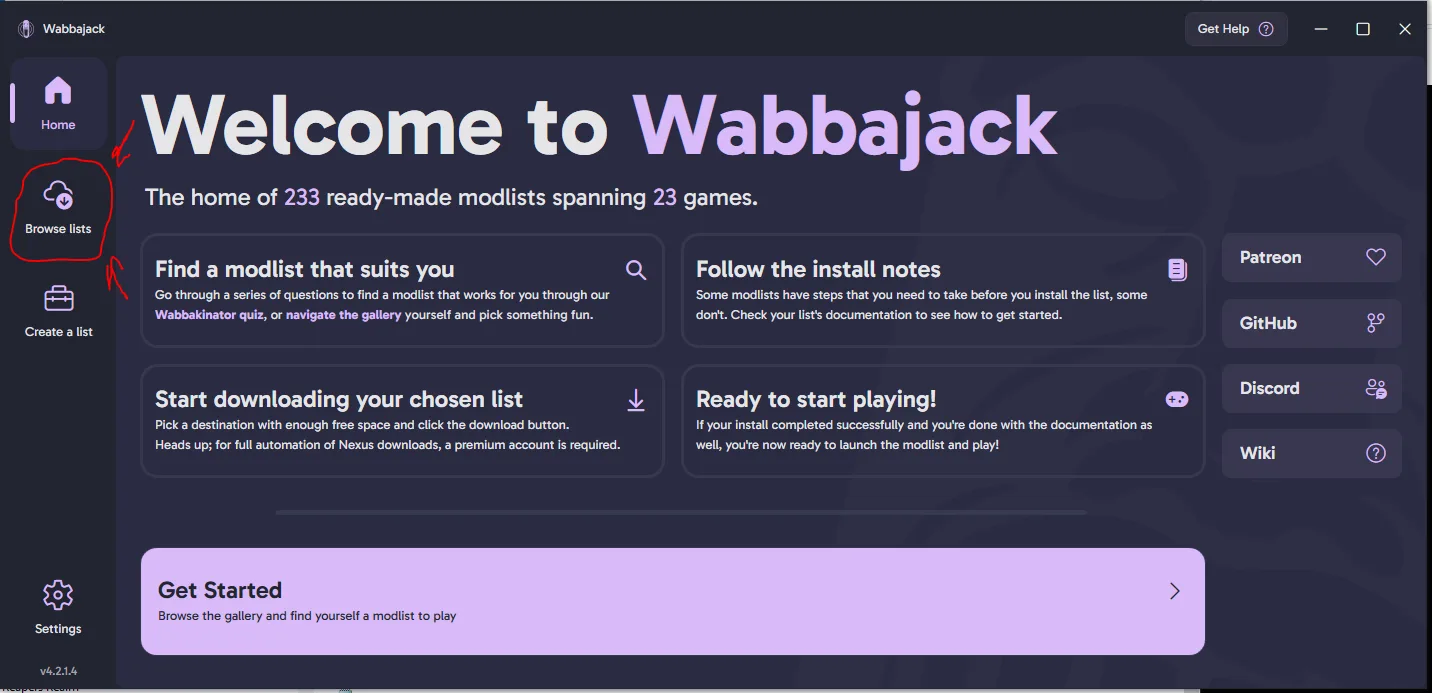
and then
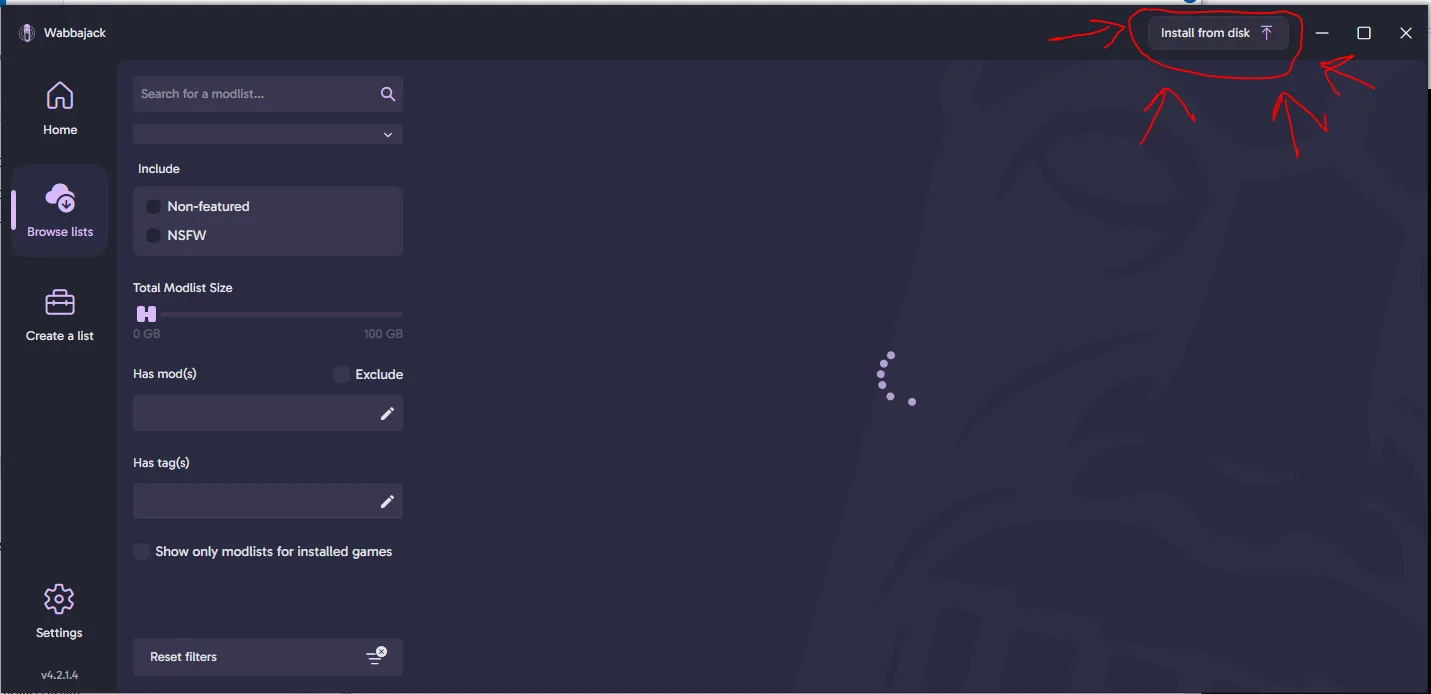
Then you want to select the Modhold wabbajack file (it is in the 7z file you downloaded from here)
and then
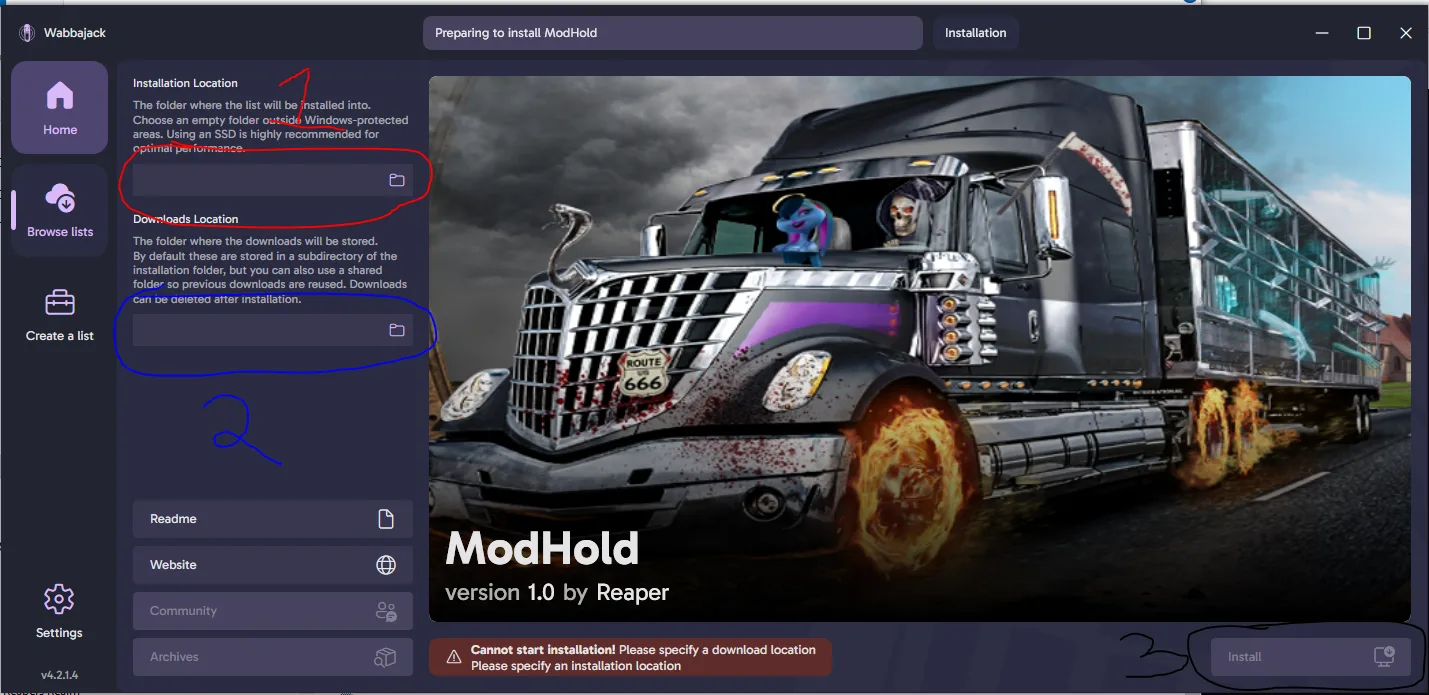
#1 - Installation Directory - This is the directory were the modlist will be installed. This must be on an SSD drive It cannot be in a systems directory (Windows, System, Documents, Downloads, ect)
#2 - Download Directory - This is the location where you would like it to put all the downloaded files. This can be on any drive (SSD, HD, EXTERNAL, Flash Card). It cannot be in a systems directory (Windows, System, Documents, Downloads, ect)
#3 - Press INSTALL.
Wait for it to download all the mods, if you have Nexus Premium, it will be all automatic without user interaction, if you do not, you will have to click download for every mod. When it is done downloading, it will install the mods, and the modlist, adding in the custom patches, and edits.
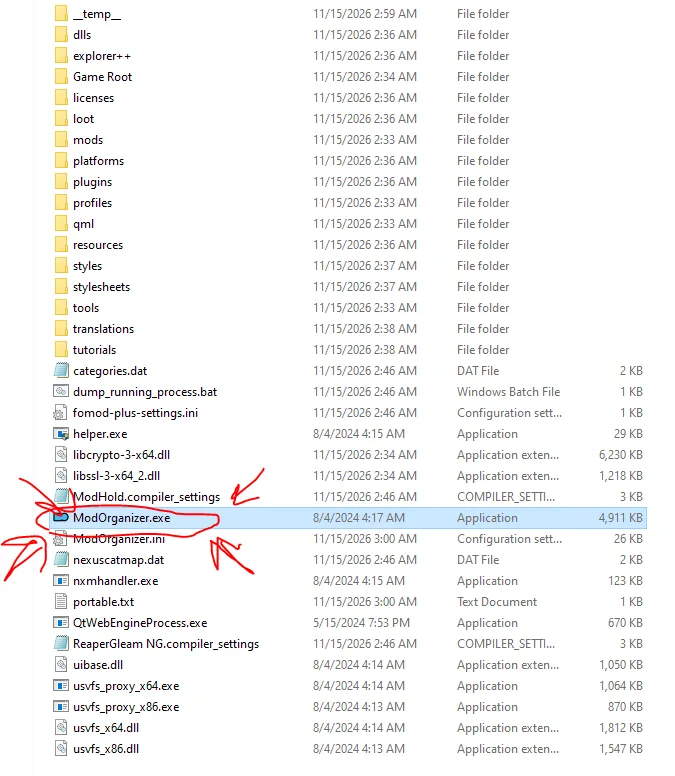
When it is done downloading.. goto your installation folder (the folder you selected in STEP #1 of the installation). Then click on Mod Organizer.exe to load it. When it finishes loading.. You will notice a few things..
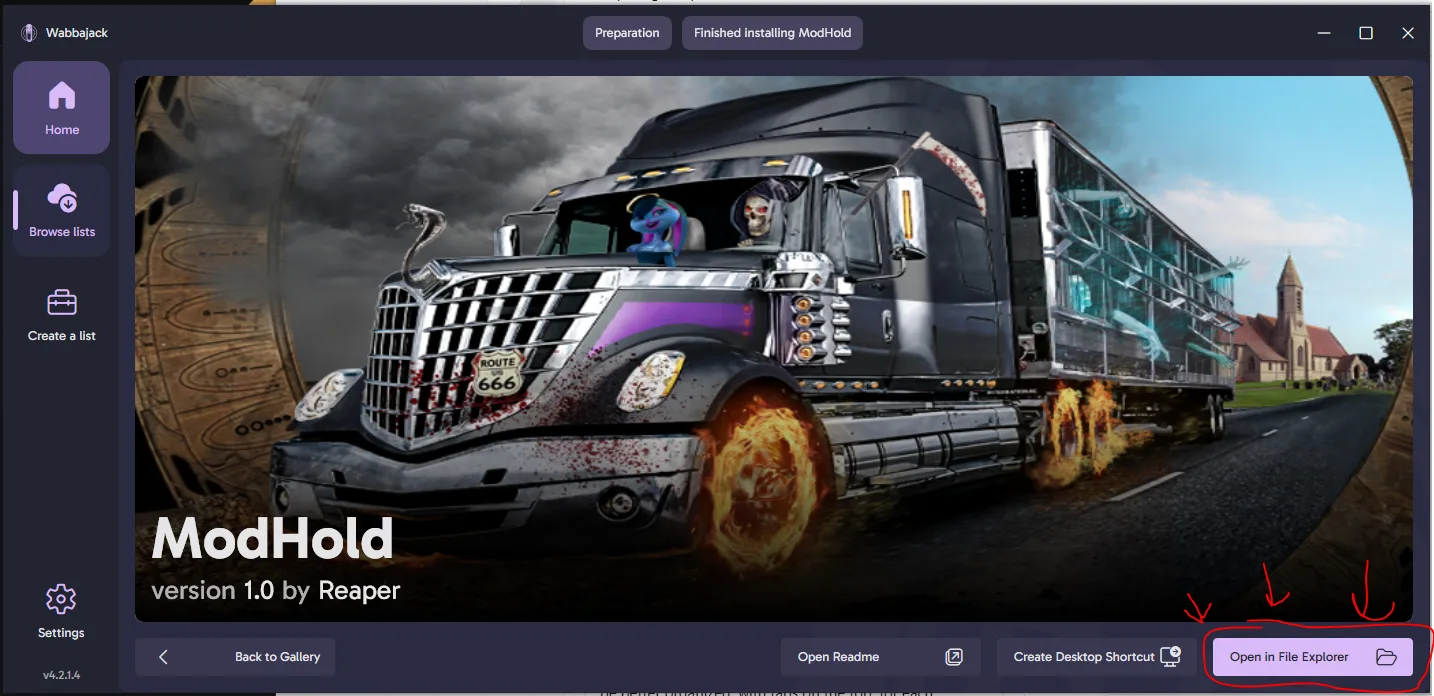
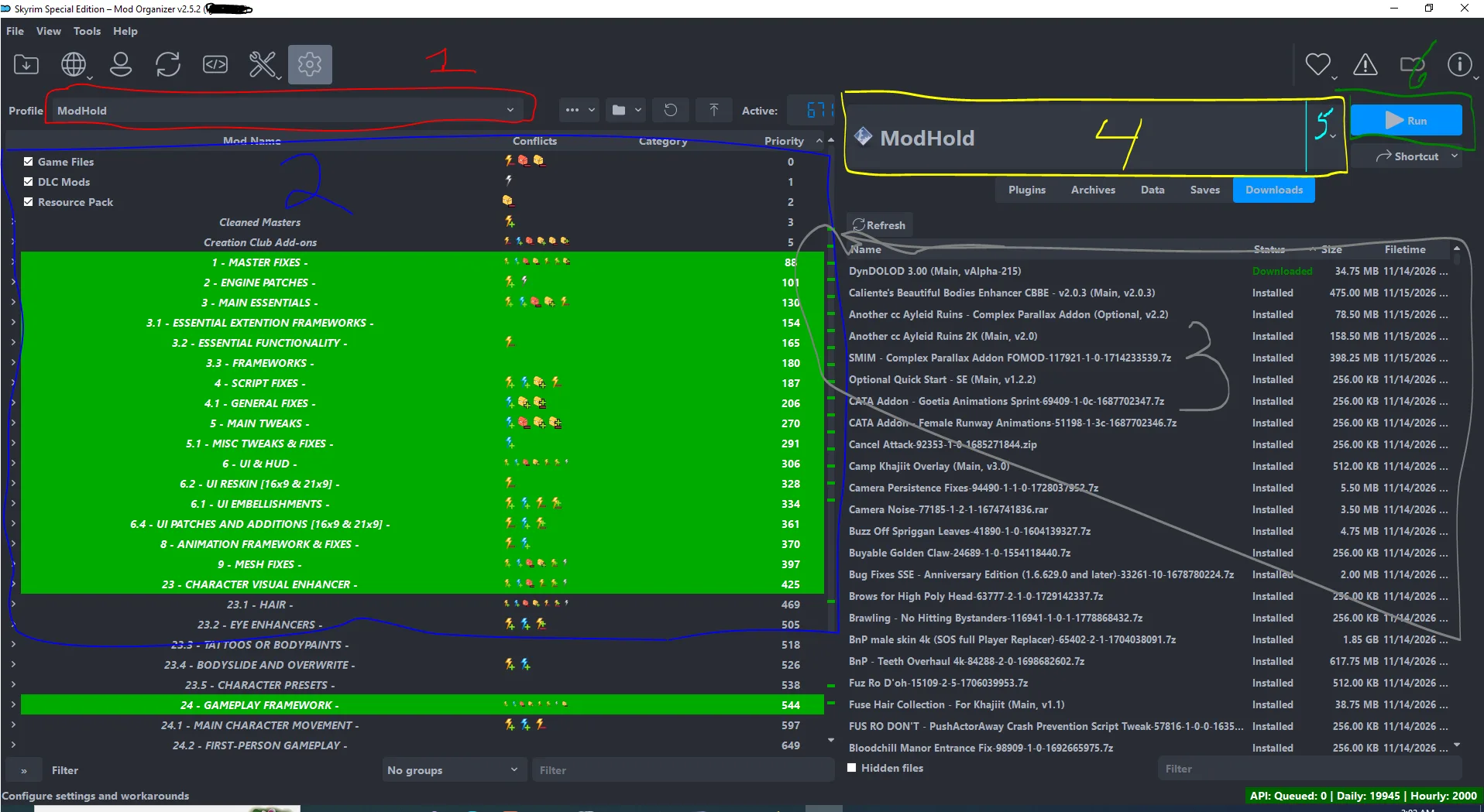
this is Mod Organizer.. to just get into playing the game, you will want #6 (PLAY), make sure the shortcut (#4) says ModHold.
#5 is the arrow, to open up the shortcut menu, their you can change the shortcut you are going to use, or edit/create new shortcuts
#3 - Is the RIGHT PANEL. here we have the tabs for DOWNLOADS (so you can see, and install downloads).. and PLUGINS.. (load order)
#2 - Is the Left Panel. This is the priority panel, the lower mod, will win conflicts for assets (mesh, texture, same name plugins, ect)
#1 - Is the PROFILE bar, this is where you can select a new profile, copy a profile (strongly recommended copying the profile rather then messing up the default profile.)
Too get started with EoS mods, simply download them.. install them.. and enable them (in the LEFT PANEL #2.). and then PLAY
***********************************************************************************
KNOWN ISSUES
***********************************************************************************
If your game crashes at the main menu.. hit WIN-R , then type %localappdata%, it will open a file explorer window.. Scroll down and find Skyrim Special Edition, delete that folder..
It uses Mod Organizer 2, based on v1.6.1170 (you will need the Current 1.7 update of the game and the CC content in order to install)
Now, many will be saying "But Reaper, I have no clue how to use Wabbajack" or "Reaper I have only used Vortex, I tried MO2 and its to complex".. well follow this guide.. and it will walk you through everything.. It's so easy even a Caveman can do it..
First you want to goto Wabbajack and download the current version of wabbajack..
Load the WABBAJACK file - and then
and then
Then you want to select the Modhold wabbajack file (it is in the 7z file you downloaded from here)
and then
#1 - Installation Directory - This is the directory were the modlist will be installed. This must be on an SSD drive It cannot be in a systems directory (Windows, System, Documents, Downloads, ect)
#2 - Download Directory - This is the location where you would like it to put all the downloaded files. This can be on any drive (SSD, HD, EXTERNAL, Flash Card). It cannot be in a systems directory (Windows, System, Documents, Downloads, ect)
#3 - Press INSTALL.
Wait for it to download all the mods, if you have Nexus Premium, it will be all automatic without user interaction, if you do not, you will have to click download for every mod. When it is done downloading, it will install the mods, and the modlist, adding in the custom patches, and edits.
When it is done downloading.. goto your installation folder (the folder you selected in STEP #1 of the installation). Then click on Mod Organizer.exe to load it. When it finishes loading.. You will notice a few things..
this is Mod Organizer.. to just get into playing the game, you will want #6 (PLAY), make sure the shortcut (#4) says ModHold.
#5 is the arrow, to open up the shortcut menu, their you can change the shortcut you are going to use, or edit/create new shortcuts
#3 - Is the RIGHT PANEL. here we have the tabs for DOWNLOADS (so you can see, and install downloads).. and PLUGINS.. (load order)
#2 - Is the Left Panel. This is the priority panel, the lower mod, will win conflicts for assets (mesh, texture, same name plugins, ect)
#1 - Is the PROFILE bar, this is where you can select a new profile, copy a profile (strongly recommended copying the profile rather then messing up the default profile.)
Too get started with EoS mods, simply download them.. install them.. and enable them (in the LEFT PANEL #2.). and then PLAY
***********************************************************************************
KNOWN ISSUES
***********************************************************************************
If your game crashes at the main menu.. hit WIN-R , then type %localappdata%, it will open a file explorer window.. Scroll down and find Skyrim Special Edition, delete that folder..